IK Multimedia Lurssen Mastering Console v1.2.0 macOS
Master your music with the secret techniques.
Master your music with the secret techniques, workflow and world-renowned know-how of Lurssen Mastering
Lurssen Mastering Console is a groundbreaking new mastering tool for either iPhone, iPad or Mac/PC that puts a lifetime’s worth of professional mastering experience at your fingertips.
Created in collaboration with Mastering Engineers Gavin Lurssen and Reuben Cohen of Multi Grammy Award winning facility Lurssen Mastering, Inc. in Los Angeles, it puts you at the controls in the studio with all of the secret tools, settings and techniques that have made the Lurssen sound so sought after by the world’s top-tier recording artists and producers.
Features
Created in collaboration with mastering engineers Gavin Lurssen, Reuben Cohen and the team at multi-Grammy award-winning Lurssen Mastering, Inc.
Accurately reproduces Lurssen Mastering’s unique philosophy, studio workflow and signal chain
Separate versions available for iPhone/iPad and Mac/PC
Mac/PC version works as a standalone application or as a plug-in for your DAW
40 pre-made “Styles” created by Gavin Lurssen and team that reproduce the settings and gear used to master pop, hip-hop, rock and more
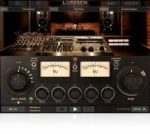
3 easy-to-navigate displays: A Studio view with controls, a Wave waveform view and a Chain view for individual processors
Input Drive knob
5 band EQ with fixed frequency
“PUSH” Knob to subtly enhance selected song passages via uniform EQ adjustment
Full automation of audio content adjustment
Full automation of audio content adjustment
Linkable Input Drive control for stereo balance tweaks
Input/Process assignable VU metering
Stereo/Mono monitoring capability
88.2/96kHz DSP processing
Audio import from iPhone/iPad music library
Resizable GUI (Mac/PC version)
Full-featured modes available via in-app purchase: Play/Process and HD Engine (iPhone/iPad version)
Digital Delivery Mastering (DDM) feature ensures your masters conform to Apple’s “Mastered for iTunes” specifications and other digital distribution systems
Project file compatibility between Mac/PC and iPhone/iPad
Relese Notes
Lurssen Mastering Console v1.2.0
Added official Apple Silicon architecture support, the minimum required macOS version is now 10.13
Added high res images and UI scaling
Added AAX Page Table support also on Windows and fixed UI not updating to MONO when changing channel configurations in the DAW’s channel strip settings
Standalone: improved stability
Installer: added plugin type selection to the macOS installer and total size reduction