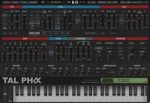
Togu Audio Line TAL-Pha v1.2.6 U2B macOS
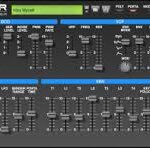
TAL-Pha is an instrument plug-in that emulates the sound of the analog 80’s synthesizer Alpha Juno II (MKS-50 is the rack version).
The plug-in produces the classic analog sound, combined with modern flexibility and many additional functions. The plug-in can read and convert sysex information from the hardware and can also be used as a controller.
FEATURES
• Authentic emulation of the 80’s hardware synthesizer.
• Resonance boost for filter self-oscillation.
• The possibility to detune, modulate, and sync the pulse part of the DCO.
• Simple but powerful FX section with delay, reverb, and a bell-eq.
• Arpeggiator with different modes.
• Stereo UNISON mode with up to seven voices.
• Aftertouch and MPE support.
• Microtuning support (tun file import and MTS Client).
• Original factory banks included.
• More than 380 fresh presets by Electric Himalaya, The Unfinished, Saif Sameer, emptyvessel and TAL.
• Individual tuning for every voice converts the synths DCO into a VCO.
• Reads Sysex files and Sysex MIDI from the hardware device.
• Can also control a hardware device. If enabled, it sends Sysex through the plug-in MIDI output (only possible when supported by the DAW).