Acon Digital Verberate Immersive 2 v2.2.10 macOS
Verberate Immersive 2 is a surround reverb and a 3D capable edition of — our algorithmic reverb plug-in that simulates real acoustical spaces with exceptional realism. Verberate Immersive 2 replaces Verberate Surround and supports all common surround and immersive formats up to 7.1.6 channels. The new Vivid Hall algorithm adds time variance to avoid the stiffness that plagues convolution based reverbs while preserving the natural high density reverb tails of Verberate Surround 1.
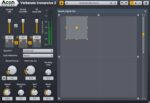
Verberate Immersive 2 was developed in close cooperation with professionals in film and TV post production. Great efforts were made to create a tool that not only delivers best-in-class audio quality, but also delivers results quickly through a well thought out workflow. Verberate Immersive 2 offers complete and independent control over the panning of the dry sound, late reverberation and early reflections. The panners work in up to three dimensions and have adjustable divergence. The pan positions and divergences are visualized and adjusted in an intuitive way, thus simplifying automation of complex movements.
Homepage https://acondigital.com/products/verberate-immersive/