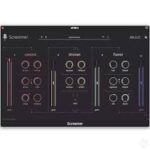
Ablaze Audio Screamer v1.0.0 U2B macOS
Screamer Extreme vocal FX.
Screamer is the ultimate plugin for turning your raw screams into the massive, larger-than-life vocal sound that defines modern metal. The plugin will instantly take your lows, mids, highs, gutturals and pig-squeals to the next level. And… Screamer is zero-latency, so you can record straight into the plugin during your studio sessions, and even live! Screamer instantly gives your raw screams a polished and massive sound, with no latency. While tracking, this allows you to quickly audition your vocal takes as if they were fully mixed, or record straight into the plugin. No more guesswork tracking vocals!
No more guesswork
Screamer instantly gives your raw screams a polished and massive sound, with no latency. While tracking, this allows you to quickly audition your vocal takes as if they were fully mixed, or record straight into the plugin. No more guesswork tracking vocals!
No more double-takes
Screamer eliminates the need for layering multiple takes to get that larger-than-life sound. While tracking, this allows you to fully focus on your vocal performance, and nailing that one great take. No more frustration and hours wasted recording double-takes!
No more routing-hell
Screamer lets you mix your vocals all on one track without any busses and sends. While mixing, this means you can truly focus on creating your vocal sound, and creating it fast, in a matter of minutes. No more routing-hell and doing online mixing courses!
Homepage https://www.ablazeaudio.com/