WhyFi 1.4.2 for Mac – Wi-Fi Diagnostic & Troubleshooting Tool
WhyFi is a handy menu bar utility for macOS that continuously monitors your network connection and quickly shows you exactly why your Wi-Fi is slow or unstable. It tracks your connection health across multiple levels, including Wi-Fi signal strength, router latency, internet service provider (ISP) quality, and DNS performance.
If you’ve ever experienced sudden drops during video calls or painfully slow loading times, WhyFi eliminates the guesswork. Using intuitive color-coded indicators, it highlights exactly where the bottleneck is occurring and provides actionable advice on how to fix it.
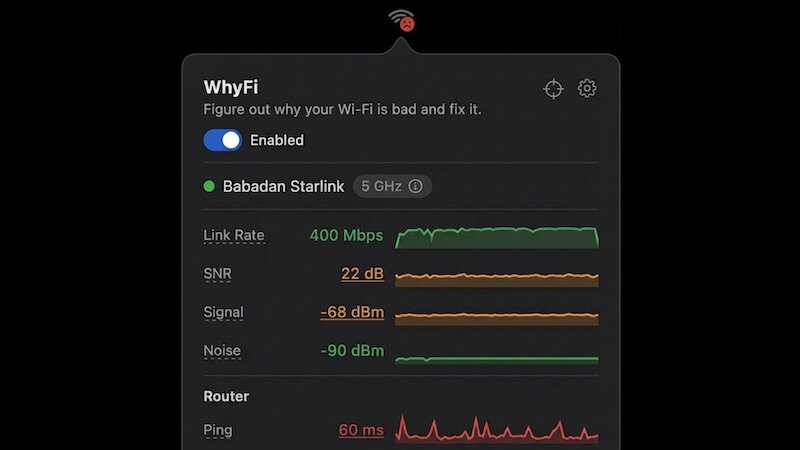
Features of WhyFi for macOS
- Continuously monitors Wi-Fi signal, router latency, ISP quality, and DNS
- Menu bar icon dynamically changes based on your current connection quality
- Color-coded indicators (green, orange, red) to quickly spot network issues
- WhyFi Radar helps you find the strongest signal spot in your home or cafe
- Built-in speed test with bufferbloat detection for stable video calls
- Wi-Fi channel scanner identifies congestion and recommends better channels
- Automatically detects captive portals commonly found in hotel or airport networks
WhyFi Radar & Signal Tracking
- Updates 4 times per second to give you real-time feedback as you walk around
- Guides you with “move on” or “go back” prompts to find the optimal location
- Scores your signal strength from 0 to 100 points for precise router and laptop placement
- Measures the direct connection quality and signal flow from your Mac to the router
Advanced Network Tools & Optimization
- Speed test detects bufferbloat, identifying critical latency issues under heavy network load
- One-click quick DNS switching lets you easily toggle between Google and Cloudflare
- Analyzes surrounding Wi-Fi networks to suggest the least congested channel
- Easily export network diagnostic reports to share with ChatGPT or Claude for advanced troubleshooting
Technical Details & System Requirements
- Developer: James Potter
- Compatibility: macOS 13 or later
- Architecture: Apple Silicon (ARM) + Intel x86 64-bit
- Language: English
- Includes: Pre-Activated (RG)
Installation Instructions
Open the downloaded .dmg file and drag the application to the Applications folder shortcut inside the image. Once copying is complete, launch the app directly from Launchpad.
Homepage https://whyfi.network/