Arturia Efx AMBIENT v1.0.0.6577 U2B macOS | AU | VST | VST3 | AAX
Efx AMBIENT
Dreamlike processor
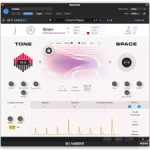
Efx AMBIENT combines spectral processing, Feedback Delay Networks, and complex effect pathways to create novel, endlessly evolving sonic spaces. With six distinct modes, gestural parameter control and an Advanced panel for in-depth modulation and motion shaping – diffuse the unheard.
Main Features
Creative ambient processor with advanced modulation
Multi-Mode architecture:
Six distinctive Modes, each with a dedicated Tone + Space signal path and character FX
Spectral processing engine:
Frequency-based processing that reshapes harmonics, timing, and pitch
Feedback Delay Networks:
FDN-based Space processing adds depth and diffusion
Tone + Space control:
Tone shapes the character: Space adds depth and diffusion – with shared Dry/Wet, Pitch, Size, Decay, Width, and Modulation controls across each mode.
Dual-axis Macro control:
A central 2D X/Y Macro lets you explore multiple parameter changes at once for fast, expressive sound shaping.
Advanced modulation system:
Four modulators (Sequencer, Function, Random, Envelope Follower) add movement and dynamics
Drag-and-drop programming:
Drag-and-drop Macro routing with amount, curve, and range controls for easy sound design and complex multi-parameter transitions.
Utilities & mix control:
Input EQ, Pre-Delay, Ducking, and latency compensation keep dense textures musical, clear, and time-aligned.
Presets & browsing:
91 expertly-designed presets for inspiring results across a range of effect types.
Homepage https://www.arturia.com/products/software-effects/efx-ambient/overview