
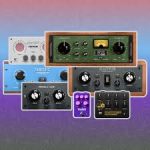
Canvas Audio Everything Bundle 02.2026 macOS
What’s Included
Get every Canvas Audio plug-in, including our brand new SubTec and our NEWEST plug-in Mixtape.
Cactus Clipper Bundle
Add just the right amount of prickly attitude to your mix—whether you need clean loudness or gritty, analog-style saturation. Push it gently or slam it hard—either way, it hits like a desert sun.
Oak Dynamic Tone Shaper
Transparent EQ and enhancement for pristine clarity. Bring out the detail and presence in your mix without coloring the original character.
Honeycomb Bass OD
Add a touch of vintage warmth and character to your bass tracks. This overdrive pedal is designed to give your bass a rich, full sound with just the right amount of distortion.
violet fuzz
Violet Fuzz delivers vintage grit and modern flexibility in a bold purple box. Sculpt your tone with a full 3-band EQ, flip between two fuzz modes, and blend in your clean signal for clarity beneath chaos. Sweet, savage, or somewhere in between.
Mixtape
A grungy cassette saturator with gentle compression and nostalgic grit that turns lifeless signals into timeless memories.
8k
The magical frequency that brings life to everything it touches. Whether you’re adding that perfect shine to vocals or making elements cut through the mix, 8K delivers that classic console character with musical precision.
Included
8K v1.0.4
Cactus Clipper v1.0.16
Honeycomb Bass OD v1.0.7
Mixtape v1.0.5
Oak Dynamic Tone Shaper v1.0.11
Prickly Clip v1.0.2
Violet Fuzz v1.0.6
Homepage https://www.canvasaudio.net/bundles/everything-bundle





