Elektra Magika Drums Stage Custom v1.0.0 U2B macOS
Drums Stage Custom drum plugin using various real microphones per element, not emulations.
Ultra-performant, microphone-centered drum plugin using various real microphones per element, not emulations. Blend different microphones with precise control and use multi-out routing to mix each element separately like you would with a real drum kit. Real Microphones& Over 5000 multi-mic samples were recorded using state-of-the-art equipment centered around very well known british desks in a professional studio. The result is clean transients, natural dynamics, and a musical tone you can trust in any mix. At no point did I use microphone-emulations for the samples or DSP.
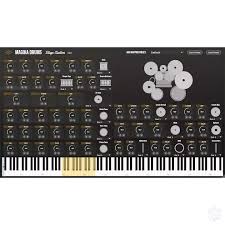
Mic Levels
Every Element of a drum, like kick, snare, and toms, has dedicated microphone level controls for precise mixing. All microphones are already phase aligned for optimal sound quality.
Blend as many of the up to 6 microphones as you want to create a unique drum sound
Use Mute to silence individual microphones and save even more CPU
Use phase invert to get interesting phase relationships and tonal variations
Route Multi‑Outputs
Create separate DAW tracks for each element, for example kick, snare, and toms. Process them independently for maximum control. Treat this like you would treat any multi-out synth in your DAW and you will be fine.
Select the desired plugin output channel on the instrument track. This defaults to Out 1. All outputs are stereo.
Assign these outputs to dedicated channels in your DAW. Have a look at your DAW’s routing options for details.
MIDI Mapping
Use the built-in MIDI mapper to switch between the most common drum kit configurations and customize your playing experience.
Choose from various preset drum kit configurations from the dropdown menu
The piano roll view shows the current MIDI mapping by highlighting the corresponding notes
Use this to align your setup with your edrum-kit or using Magika Drums as a drop in replacement for other drum software.
• Microphone blending with dedicated controls
• Multi-out for granular DAW processing
• Low CPU usage and zero added latency
• Clean, performance-focused UI