
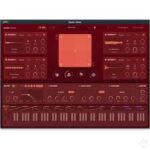
Excite Audio Evolve Velvet v1.0.0 U2B macOS AU VST VST3 STANDALONE AAX
Evolve Alloy The Sound of Nostalgia.
Evolve Velvet combines over 250 sound sources ranging from felt pianos and classic electric keyboards to timeless strings and sought-after classic synths from the 70’s and 80’s. The result is a smooth, expressive sound palette that ranges from acoustic and intimate through to lush, rich electric tones that provide a vintage quality to your music. Blend your sound from four layers, morph between them with the XY pad, and then shape the output using four velvet inspired macro effects: Soften, Warmth, Sway and Haze. Evolve Velvet offers dual filters, endless modulation potential and 16 effects modules to power its 250 presets crafted by Excite Audio’s team of professional sound designers.
Whether you’re sketching soulful jazz chords, building lo-fi house grooves, or painting psychedelic pop textures, Evolve Velvet makes cozy, timeless tones that are instantly playable and inspiring.
Key Features:
Blend four layers of samples or synths using the powerful quad-engine.
Morph sounds in real time with the expressive XY Pad.
Get instant creative sparks with one-click randomisation.
Import your own samples and build entirely custom patches.
Modulate anything with drag-and-drop envelopes, LFOs, and XY controls.
Shape and polish your sound with metal-inspired macro effects.
Tweak your tone with dual filters and a rearrangeable 3-slot FX chain.
Explore 250 genre-spanning presets or create from scratch.





