
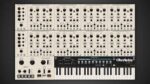
GForce Oberheim OB-E v2.6.0 macOS
The Oberheim OB-E is our take on the legendary Oberheim® 8-Voice and the first software instrument ever to receive Tom Oberheim’s personal endorsement.
More than just an emulation, the OB-E offers a unique musical experience. Sounding HUGE, it takes the iconic Synthesizer Expander Module (SEM™) based 8-Voice (a.k.a the EVS) into new sonic territory via a raft of enhancements and additions.
The concept of the 8-Voice is actually very simple; based around a single SEM containing two VCOs with Pulse and Sawtooth waveforms, two ADS Envelope Generators, one LFO, and a magical Multi-Mode Filter. In isolation each SEM is monophonic, but in the 8-Voice, because there are eight SEMs triggered by a polyphonic keyboard, you have a superb eight note polyphonic synthesizer.
This unique Octaphonic architecture offers fresh and exciting creative possibilities to music producers, composers and sound designers for the first time in the digital realm.
Now includes a complimentary Oberheim OB-EZ license.
Key Features
An authentic sounding emulation of the Oberheim® 8-Voice
Unique 8-Voice Octaphonic architecture
700 factory Patches designed to fit in a mix, all tagged and categorised
[New] 100+ New presets & new Matrix Reverb
[New] Vintage knob & Refined Detune parameter
[New] Drum Mode and 10 drum kits presets
[New] PC support, VST3 and Apple Silicon Native
[New] Flexible scaling UI & Sequencer Zoom
Zero delay feedback filters
Librarian for easy access to the Patches (Arrow Keys Navigation)
Continuous, round-robin mode where each note uses a new voice
ZOOM enlarges an individual SEM filling the UI with front and rear panels side by side
Group mode to edit all Modules at once
Individual SEM Copy, Paste and Save
LFO, 3rd VCO doubling as a second LFO
Multiple triggering modes; Polyphonic, Monophonic, Mono Legato, & Unison
Fully featured analogues style MIDI Sequencer, Stereo Delay and lush Reverb
Upper/Lower sections can be Split across the keyboard
Extensive Velocity & Aftertouch modulation
Polyphonic aftertouch and MPE ready
Includes an Oberheim OB-EZ license






need windows to license. KEYgen.
help me