Lunacy Audio BEAM v2.1.4 macOS
BEAM 2.0 is a modular effects playground filled with a growing collection of cutting-edge effects to transform your sounds. Use any Lunacy effect directly in BEAM to sparkle your keys, spice up your vocals, reshape your drums, and launch your synths into outer space.
What’s new in 2.0?
– Use all BEAM effects as standalone plugins
– New Effect: Haze (Chorus, Dispersion, Reverb)
– 80 New Impulses (Tonal, Dispersion, and Noise Blur)
– 60 New Node Presets
– Major filter updates with new filter types and rolloff control
– Modulation updates with new LFO and sidechaining
– Mid-side control per path
– Major performance optimizations and UI improvements
– 50% faster user interface rendering
– QOL features like setting a default patch
FEATURES
Space Effect
A stunning convolution reverb effect featuring a curated set of impulse responses, including sound design by Benn Jordan and Venus Theory.
These aren’t your average spaces – dive deep into a collection of textural spaces designed to transform audio into new soundscapes.
Grains Effect
A real-time granular effect perfect for shimmering particle clouds, glitchy percussive grooves, and rhythmic soundscapes.
Built for speed and performance, BEAM allows up to three parallel grain engines at once.
Haze Effect
A silky smooth chorus and phase effect with lush algorithmic reverbs and dispersion. Add buttery stereo width, or go wild with the feedback to create otherworldly resonances and reverb timbres.
Powerful Filters
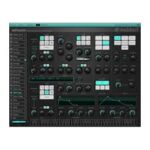
A collection of creative filter types ranging from classic lowpass filters to comb filters with frequency, rolloff, resonance, and stereo width control.
Use up to four filter nodes in serial or parallel to dial in the right frequencies for each patch.
Don’t limit yourself.
Dynamic Graph
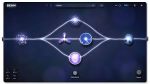
Build complex effect layouts using an interactive visual audio graph.
BEAM allows endless combinations of parallel and serial sequences with up to 6 parallel paths.
Modulation
Harness the power of LFOs, an enveloper follower, and a macro control with drag and drop modulation. Browse dozens of LFO presets or draw your own shapes with a powerful curve editor, featuring quick edit tools, grid snapping, and a magic LFO shape generator.
Standalone Effects
Use any BEAM effect as a standalone plugin for a faster workflow. Build complex patches with any Lunacy effects in BEAM, or just focus on a single effect.
Homepage https://lunacy.audio/products/beam/