
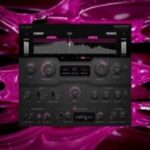
Plugin Alliance Brainworx bx_glue 1.1.0 macOS U2B
Get the sound of the greatest British-made VCA compressors of the 1980s, the warmth, punch and cohesion of analog glue compression with all the power and control of a modern Brainworx feature set with multiband capabilities. For the pros in search of the perfect mixing glue and amateurs, whose mix never quite gels, this is the definitive VCA glue compressor. Brainworx bx_glue brings it all together.
Analog glue compression that goes beyond digital multiband
The modern multiband capabilities in bx_glue allow you to compress low and high-frequency content independently, perfect for sidechaining. You can also set Band Link to 100% to apply classic broadband compression, adjust the Band Tilt parameter to cut/boost each band inversely, and balance levels post-compression. bx_glue is made to inject vintage warmth into modern music production.
The legacy of VCA compression in one plugin
For those who like to go deep or want a specific sound, you can create the character of almost any VCA compressor with bx_glue’s rich tone section. Go from light to heavy saturation with the XL saturation knob, add air or grit with nickel and iron input transformers, and switch between classic and dirty flavors with the total harmonic distortion control.
Tame transients and protect your tonal balance
bx_glue’s emphasis section gives you the perfect combination of character and control. Precisely and aggressively target unwanted frequencies, pre-compression, and de-emphasize post, to eliminate harsh frequencies while maintaining the tonal balance of your tracks.
Vintage glue for your busses and groups
bx_glue delivers exactly what a studio quality VCA compressor should – snap, character, and cohesion for subgroups and stereo busses. Stick bx_glue on a bus or track, select a preset or tweak the top section, to inject instant gluey goodness into your mix.
Enhance individual tracks with vintage glue
Use bx_glue’s depth of features and tonal flexibility to apply vintage glue with precision and enhance individual tracks. This works especially well on vocals, guitars, bass, drums. Any group or track that needs more balance or mojo will benefit from the precision of bx_glue.
→ FEATURES:
• Unique and flexible dual-band glue compressor inspired by legendary British bus compressors
• Detailed input, output, and gain reduction meters, and auto gain control for accurate easy monitoring
• Ability to match and replicate almost any VCA compressor’s character
• Classic VCA compressor in a modern two-band matrix
• Stereo compressor with a single set of controls
• Sophisticated Tilt/Tub Emphasis for dynamic tonal balance
• Band Tilt instead of makeup gain to simplify tonal balance
• Classic and Dirty total harmonic distortion (THD)
• Nickel and Iron transformer models
• Inaudible 12 dB/oct two-way crossover
• Adjustable XL saturation
• Spectral analysis and precise i/o metering
• Auto gain to conduct level-matched A/B comparisons
• Stereo Width and Mono Maker
• Advanced Sidechain Option: blend external and internal key sources
Compatibility: macOS 12.0 or later • Apple Silicon or Intel Core processor
Homepage https://www.plugin-alliance.com/en/products/bx_glue.html





