uJAM Virtual Guitarist CINEDREAM v1.0.0

Apr 17, 2025 , Application, Audio & Music
uJAM Virtual Guitarist CINEDREAM v1.0.0
Name:
CINEDREAM.v1.0.0m_mactorrentdownload.com.rar
Size:
3.6 GB
Files:
CINEDREAM.v1.0.0m_mactorrentdownload.com.rar [3.6 GB]
UPDATED Apr 17, 2025
RATING
4/5 - (1 vote)
PREV. VERSIONS Latest Only

uJAM Virtual Guitarist CINEDREAM v1.0.0 U2B macOS

CINEDREAM Cinematic Guitar Textures.
Add guitar-driven soundspheres to your music
Guitars that don’t sound like guitars
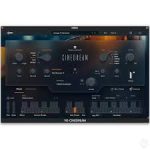
Virtual Guitarist CINEDREAM makes it dead easy to create ambient guitar textures for any musical situation. A perfect tool for building moody backdrops, evolving pads, and emotional underscore. Based on real guitar, shaped by sound design.

What’s inside?
30 styles focused on cinematic guitar
Contour knob fades between slow attacks and long sustains
5 amp models from clean shimmer to distorted grit
2 multi-effect engines for pads, pulses, and ambiences

Player Mode
Hold a key or chord, and CINEDREAM performs slow, cinematic guitar phrases in real time—perfect for creating ambient textures and evolving soundscapes with minimal input.

OPEN PLUGIN TWICE FOR THE FIRST TIME

Homepage https://www.ujam.com/guitarist/cinedream/

Frequently asked questions

How do I install the app?
Mount the image, drag the app into the "Applications" folder and launch it. If the system blocks the launch, allow it in "System Settings → Privacy & Security".
The app is damaged or won't launch
Reinstalling from a fresh image usually helps. Make sure your macOS version matches the one listed in the compatibility specs.
How do I update?
Download the new version from the site and install it over the current one — your settings will be preserved.
The download link doesn't work
Try a mirror or a download manager. For large files the browser often drops the connection.
How do I completely remove the app?
Use an uninstaller utility — it cleans up the service files that remain after moving the app to the trash.

Leave a Comment