
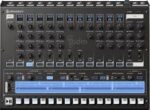
Audio Realism ADM1x v1.6.1.9 macOS
Experience the essence of vintage drum machines from the early 80s with ADM, the ultimate groovebox plug-in. Featuring booming bass drums, saucy cymbals, and crispy snares, ADM brings the classic sound of three iconic drum machines together in one powerful tool. With a 32-step internal sequencer and pattern controlled effects (PCF), you can create dynamic beats with ease.
ADM offers 25 meticulously modeled drum generators inspired by analog circuits of the past, along with 4 PCM players, delivering a total of 34 authentic sounds.
Certain sounds in ADM have been enhanced with additional parameters, such as the tuning and attack options for the 606 bass drum. The accents effect on the bridged-T oscillators found in the bass drum and tom-tom sounds have been faithfully replicated, ensuring a true vintage sound.
Import your patterns seamlessly into ADM using the Import Rebirth function or directly from your 909 via sysex with the provided free tool for sysex dumping. The hihats and cymbals in ADM closely resemble the originals in sound and response, making it a must-have for producers seeking that classic drum machine vibe.
FEATURES
Three authentically emulated classic drum machines (606, 808, 909, plus additional 707,727 samples)
Apple M1-compatible
Internal step sequencer with global accent per step, four pre-scales per pattern
Flam per step and shuffle per pattern
Pattern Controlled Filter (PCF)
Full MIDI CC with learning function
Import Rebirth patterns
Imports 909 Sysex (via external Sysex tool)
Two MIDI Modes (Pattern and Note)
Load your own .wav and .aiff samples into the drum parts
80+ Example patterns
Homepage https://audiorealism.se/products/audiorealism-drum-machine





