LANDR Vocal Plugin Bundle v2025.12 U2B macOS
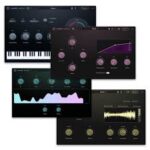
Shape, polish, and perfect every vocal take with four powerful plugins built for voice. From clean-up to creative tone shaping, the Vocal Plugin Bundle gives you total control and pro results, whether you’re tracking, mixing, or performing live.
All-in-one tools for polished, professional vocals
Get everything you need to transform raw vocal takes into pro-level performances—fast. The LANDR Vocal Plugin Bundle includes four powerful, easy-to-use plugins designed specifically for vocals: VoxTune, VoxVerb, VoxDeEss, and VoxChain. Whether you’re recording, mixing, or performing live, this suite helps you stay creative and in control, with zero distractions and flawless results.
VoxTune
Real-time vocal tuning
Stay pitch-perfect with natural or robotic tuning. Zero-latency processing lets you record or perform in real time while shaping vocal tone with formant and vibrato control.
VoxChain
All-in-one vocal strip
Sculpt vocals with EQ, compression, and saturation—all in one plugin. VoxChain streamlines your vocal workflow with pro-quality polish and intuitive, voice-focused controls.
VoxVerb
Clean, vocal reverb
Add clean, immersive depth and space to your vocals. Tailored for vocal clarity, VoxVerb blends lush reverbs with precision tonal sculpting using Body and Air controls.
VoxDeEss
Silky, clear de-essing
Tame harsh “S” sounds fast with pinpoint control and no loss of brightness. Visual feedback, auto gain, and zero-latency performance make editing effortless and transparent.
Homepage https://www.landr.com/plugins/landr-vocal-plugin-bundle