
Forever 89 Visco v2.0.0 U2B | macOS
Introducing Visco — VST/AU plugin that can model and manipulate any sample you supply, freeing you from the usual limitations of working with recorded audio.
Equal parts designated beat maker, competent sound design tool, and live performance drum machine — Visco is a VST/AU plugin that can model and manipulate any sample you supply, freeing you from the usual limitations of working with recorded audio.
meet the Blob
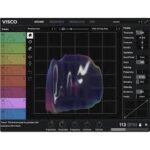
Visco is centered around the blob — a malleable representation of your sound on a 2D grid. With tools similar to modern UI design software, including a hand, magnet, eraser tool, plus a crossfader, you can grab, pull, push, and blend your sound however you please.
Use Visco to bend and stretch samples across frequency and time, meld the qualities of two sounds into one, or fine-tune any sound to fit your mix.
All Features
8 Track, 32 Voice Drum Engine
Turn any drum sample into a synthesized counterpart, free from the usual limitations of recorded audio.
Character and Shape
Play with time, frequency, timbre, velocity, and more to create subtle and not-so-subtle variations.
Modulation Matrix
Bring your idea to life with expansive modulation options.
Step Sequencer
Develop ideas swiftly or use the randomize button for inspiration.
Mixer and effects section
Put the final touches on your idea and make it fit the bigger picture.
Presets and sound library
Get inspired from the get-go with included presets and sounds.
Homepage https://forever89.studio/visco/





