
Physical Audio Preparation 2 v2.1.3 macOS U2B
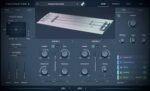
Preparation 2 creates a virtual world of augmented strings using our latest physical modelling techniques. Two strings collide with a rattle and a dynamic fret to deliver a rich palette of acoustic timbres, from unique instruments to experimental soundscapes.
Physical modelling of prepared strings
Preparation is based on mathematical modelling of 3 basic elements; strings which can be configured as bars, a rattle that joins strings together, and a dynamic fret. Each voice contains a pair of strings which are excited with either a customisable pluck, a bow, or side-chained audio. The acoustic model’s properties are tailored by you, generating a range of sounds from unique instruments to experimental soundscapes. Preparation uses our latest research into collision modelling and fast solver techniques.
Nonlinear physical modelling
The nonlinear strings can be excited with a customisable pluck, allowing you to choose different impulses for the minimum and maximum Note-On velocity. Or use the scrape of a virtual bow, with bowing force controlled by the Pitch bend wheel and position by the Mod wheel.
Dynamic Fret and Rattle
The rattle element sits across the 2 strings and transfers energy from collisions on one end to the other. This has a variable mass on each end, as well as stiffness, gap and edge parameters. The fret is underneath the strings and each one can hit it depending on the amplitude of vibration and the distance between them.
Modulation and FX
Shape your sound with fully fledged Equalizer, Compressor, Mods, Shaper, and Delay/Reverb effects, five modules that can be re-ordered then programmed deeper in their own tab. Preparation 2’s EQ, Distortion, Drive, Fuzz, Phaser, Tremolo and Wah effects come from Orastron’s Brickworks. There are also 2 LFOs, and keyboard and velocity modulation to customise the response of the model and the FX parameters.
Features:
– Physical model of 2 strings/bars with a dynamic fret and rattle. 7-voice polyphony.
– Multiple excitations with custom pluck designer, bowing and side-chain audio.
– 2 x LFOs, keyboard and velocity modulation.
– Full FX rack with EQ, compressor, shaping, delay and reverb.
– MPE compatible with custom control setup.
– 160+ presets.
– Standard AU/VST3/AAX formats for macOS.
Custom Tuning
The tuning can be customised using the Scala format, as well as a variable reference A4. This allows micro-tuning of each interval in the octave from a base C, using either cents or fractions.
The .scl tuning file should be placed in the same directory as the presets folder, which is shown at the bottom of the Info window. If a tuning file is found and loaded it will be shown next to the Reference A control in the MIDI window.
Compatibility: macOS 10.13 or later • Apple Silicon or Intel Core processor
Homepage https://physicalaudio.co.uk/products/preparation-2/





