
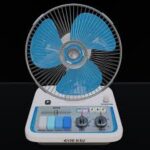
Audio Hertz FAN Multi Modulator v1.1.3 macOS
Audio Hertz FAN Experience modulation like never before with FAN, the new multi-modulator plugin from Audio Hertz that will blow your mind and tracks away!
FAN combines the user friendly interface of a classic desk fan with the power of high quality modulation. Offering four classic modulation effects, including Chorus, Vibrato, Tremolo, and Rotary. Quickly cycle through your favorites to easily shape and enhance your tracks with movement, texture, and depth.
Modeled after our favorite classic effect unitsóeach mode offers unique creative possibilities. The custom FAN effect adds a unique twist, simulating the nostalgic sound of singing or playing into an actual fan blade. If youíre looking for a fun and functional way to add personality and movement to your tracks, look no further. Let FAN become an essential tool in your production and mixing toolbox.
ï User friendly interface makes dialing in your favorite modulation effects easy.
ï Four custom modulation effects, including Tremolo, Chorus, Vibrato, and Rotary.
ï Variable waveform control allows for unique waveforms as well as the standard sine, triangle, square, and sawtooth.
ï Analog saturation circuit for added texture and warmth.
ï Custom FAN effect simulates the sound of singing into a moving fan blade.
ï Width Control: Fine-tune M/S (Mid/Side) levels to shape and adjust the stereo field with precision.
Credits:
I took the liberty of using the “Team-SneakZ” registry in the Windows installation and thanking them
Homepage https://audiohertz.com/product/fan/





