
Togu Audio Line TAL-EQ v1.1.6

Sep 9, 2025 , Application, Audio & Music
Togu Audio Line TAL-EQ v1.1.6
Name:
TAL-EQ.v1.1.6_mactorrentdownload.com.rar
Size:
25 MB
Files:
TAL-EQ.v1.1.6_mactorrentdownload.com.rar [25 MB]
UPDATED Sep 9, 2025
RATING
4/5 - (1 vote)
PREV. VERSIONS 2 Available

Togu Audio Line TAL-EQ v1.1.6 U2B macOS | CLAP | AU | VST | VST3 | AAX

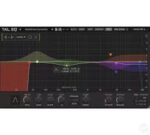
TAL-EQ is a versatile graphical equalizer designed for great sound, a fast workflow, and effortless usability. It features dynamic processing and multiple stereo editing modes. The spectrum view displays the frequency content and all changes in real time.

This plugin always runs with zero latency without oversampling and emulates the frequency response of analog equalizers. The topology-preserving filter remains stable even with fast dynamic modulations and is optimized for CPU efficiency.
Each band can be fully automated. Undo/redo and A/B comparison are also included, making it easy to find the perfect setting for any audio material. Use the mouse wheel to zoom in and out.

Customize the plugin: scale the UI to expand the EQ workspace, adjust the size of knobs and text, or change text and background colors to your liking.


Homepage https://tal-software.com/products/tal-eq

Older Versions 2

Version Publication date Size Download
Togu Audio Line TAL-EQ v1.1.6 LATEST CURRENT September 9, 2025 25 MB
Togu Audio Line TAL-EQ v1.1.5 September 6, 2025 23 MB

Frequently asked questions

How do I install the app?

Mount the image, drag the app into the "Applications" folder and launch it. If the system blocks the launch, allow it in "System Settings → Privacy & Security".

The app is damaged or won't launch

Reinstalling from a fresh image usually helps. Make sure your macOS version matches the one listed in the compatibility specs.

How do I update?

Download the new version from the site and install it over the current one — your settings will be preserved.

The download link doesn't work

Try a mirror or a download manager. For large files the browser often drops the connection.

How do I completely remove the app?

Use an uninstaller utility — it cleans up the service files that remain after moving the app to the trash.

Leave a Comment



