

Memory Booster 2.0.1

Mar 22, 2026 , Application
Memory Booster 2.0.1
Name:
Memory_Booster_2.0.1.dmg
Size:
5 MB
Files:
Memory_Booster_2.0.1.dmg [5 MB]
UPDATED Mar 22, 2026
RATING
4/5 - (1 vote)
PREV. VERSIONS 2 Available

Memory Booster 2.0.1 macOS

Type-aware file management .That makes sense. Browse through your files an intuitive way, or export them back to disk: all neatly-organized!

FEATURES
One-Click Memory Boost
Free up inactive memory instantly with a single click. Watch your Mac breathe again as Memory Booster clears RAM clutter.

Real-Time Memory Tracking
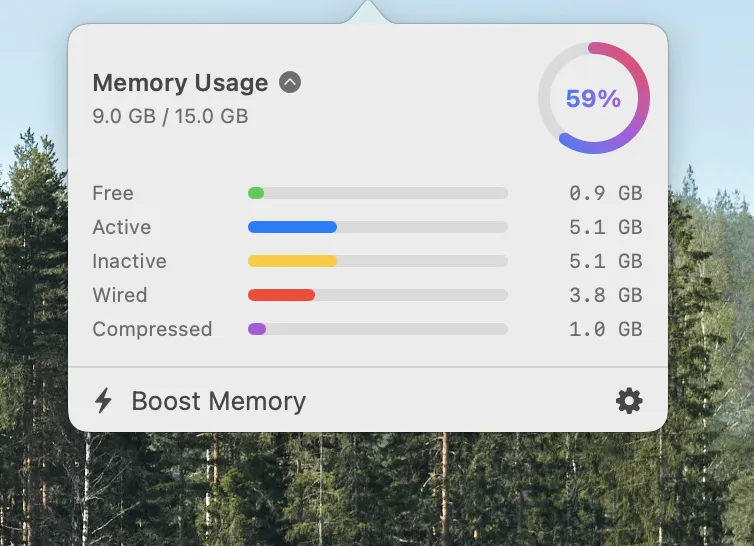
Beautiful live charts track memory usage over time, with detailed breakdowns (free, active, wired, etc).

Process-Level Insights
Identify memory-hungry apps instantly. View per-process memory charts, track averages and peaks, and kill resource hogs.

Menu Bar Convenience
Monitor memory usage right from your menu bar. Quick access to boost, detailed stats, and process management without opening the app.

Smart Alerts
Get notified when memory pressure gets high. Memory Booster intelligently alerts you and identifies which processes consume the most RAM.

Professional Analytics
Track physical, virtual, and compressed memory per process. Export data, reveal apps in Finder, and analyze memory patterns like a pro.

Compatibility: macOS 13.5 or later
Homepage https://ensili.co/app/memorybooster/

Screenshots
Older Versions 2

Version Publication date Size Download
Memory Booster 2.0.1 LATEST CURRENT March 22, 2026 5 MB
Memory Booster 2.0 January 25, 2026 5.46 MB

Frequently asked questions

How do I install the app?

Mount the image, drag the app into the "Applications" folder and launch it. If the system blocks the launch, allow it in "System Settings → Privacy & Security".

The app is damaged or won't launch

Reinstalling from a fresh image usually helps. Make sure your macOS version matches the one listed in the compatibility specs.

How do I update?

Download the new version from the site and install it over the current one — your settings will be preserved.

The download link doesn't work

Try a mirror or a download manager. For large files the browser often drops the connection.

How do I completely remove the app?

Use an uninstaller utility — it cleans up the service files that remain after moving the app to the trash.

Leave a Comment





