
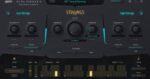
uJAM Symphonic Elements STRIIIINGS v1.2.2 U2B macOS
The emotional touch
Symphonic Elements STRIIIINGS gives you access to the emotive power of several world-class string sections, featuring exclusive recordings from Hans Zimmer’s personal multi-million-dollar library. Whether you’re scoring films, crafting dramatic pop tracks, or adding orchestral depth to your beats, STRIIIINGS brings a full cinematic orchestra to your fingertips, no formal training required.
What’s inside?
World-class string section performances, no orchestration skills required
Dedicated instrument engine by UJAM for easy playing, fun tweaking and creative sound design.
60 styles, more than 200 sound designer presets for instant inspiration
OPEN PLUGIN TWICE FOR THE FIRST TIME
Homepage https://www.ujam.com/symphonic-elements/striiiings/






..download ,,reset permission,, app its free for mac, insert pkg file and run reset permission….then run pkg file and install…it works..!!
There are various ways, type ‘How to change permissions on Mac’ into your browser and find the easiest one for you.
How to change the permission
Work, just change permissions… that’s all.
no crack! trial version.