
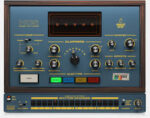
Robotic Bean Hand Clap Studio v1.4.0 macOS
Add natural-sounding claps and snaps to your music with Hand Clap Studio. This instrument plugin is the ultimate tool for handclaps and finger snaps that fits your production perfectly.
Soft and dry finger snaps for your acoustic ballad, or hard-hitting claps soaked in reverb for your next club banger–Hand Clap Studio has you covered with just a few easy tweaks of the controls.
Full sound control
Select how many clappers you want, how they clap, how they are positioned in the stereo field and how tight their timing is. Find the sweet spot between Close and Room mics, and add sampled reverb from Atlantis’ Echo Chamber. Finish off with custom-designed EQ and compression to make the claps fit your mix. The Display gives instant visual feedback of the current settings.
High quality samples
The samples were recorded with a professional percussionist in Stockholm’s Atlantis Studio – a classic studio with legendary acoustics. The samples were captured using an all-star collection of vintage mics and we included both close and room mic recording and even sampled everything through Atlantis’ own echo chamber. Hand Clap Studio packs 4 separate clap types, 5 velocity levels and plenty of round robins to create a natural sound. In total, this instrument hold over 700 samples.
Specification
Four Clap Types: Basic, Bright, Soft & Snap
5 Velocity Layers and 13 Round Robins
Close, Room and Echo Chamber microphones
Up to 8 Clappers
Display with Clapper and room visualisation
16 step sequencer with 2 patterns
3 Accent Levels per sequencer step
EQ and Compressor
VST3, AU and AAX formats





