
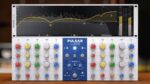
Pulsar Audio Pulsar 8200 v1.2.4 macOS | ARM
LEGENDARY TRANSPARENCY
Pulsar 8200 is a faithful emulation of the legendary GML 8200 designed by George Massenburg*, the inventor of the parametric EQ. Full EQ control is a formality today, but it was a dazzling novelty back in the days.
Just like the original machine, Pulsar 8200 gives you a tight and solid low end, a crystalline high end, and surgical control over the frequency spectrum. He perfectly replicates the all-discrete, Class-A analog electronics that made the original machine famous in the 80s, and still used today.
Its parallel topology, coupled with unique filtering shapes, allows an intuitive and unique spectrum shaping, resulting in smooth curves, and a more natural result compared to classic digital EQ, maintaining its own “analog personality”.
Main Features
Visual curve editing
Manipulate a peculiarly shaped analog EQ curve in an intuitive way. The curve editor is extremely easy to use, with a clear and concise overall frequency response display. You can edit all properties of any filter – including its assigned name – without touching the lower panel.
De-esser
An embedded simple-but-efficient de-esser gives you full control over the aggressive or harsh transients of the spectrum, to get a more polished and professional result. In the central panel, choose the frequency, the amount, and the filter type (bell or shelf).
Mid-Side processing
Make EQ changes to a signal’s centre or stereo information by operating in mid/side mode. The Listen buttons help audition each signal in isolation, and the screen displays only the channel you’re working on, so you always know what you’re doing.
Auto-gain
This control compensates for volume changes introduced by equalization, keeping output level consistent with input. It uses a C-Weighting-based algorithm to introduce a level compensation based on EQ curve analysis. Since this compensation only depends on your EQ settings, it won’t change during playback.
Tilt filter
Some things can’t be done with just bells and shelves. We’ve added a complex 6-pole tilt filter to adjust the tonal balance of your whole mix in a natural and analog-style way with a single knob.
Sub & Air band
The Air & Sub bands, inspired by the philosophy of parallel passive equalizers, allow you to fine-tune the extreme high-end and low-end of the spectrum without adding any mud or harshness.
Metering & Spectrum analyser
The on-screen analyzer displays the audio spectrum in real-time (fast and slow window settings) or over the long-term with the Infinite Spectrum setting. In addition, peak metering provides insight into overall dynamics, and RMS meters let you monitor loudness and level matching. An overall gain meter is also available.
Gain scale
For wholesale reduction or increases in gain, the Gain Scale control lets you accentuate or reduce an entire EQ curve, acting like a multiplier for all bands’ gain settings.
Homepage https://pulsar.audio/eq-8200/





